The 1440p vs 4K decision shapes your whole gaming setup, from the monitor you buy to the graphics card you need. 4K offers stunning sharpness and detail, while 1440p delivers higher frame rates at a lower cost. Neither is simply better; the right choice depends on your screen size, the games you play and your budget. This guide compares 1440p vs 4K in sharpness, performance, cost and use cases, so you can choose with confidence.
North Gaming PCs stocks 1440p monitors and builds gaming PCs for both resolutions, all priced in Canadian dollars with a 2-year warranty. Every price is shown in Canadian dollars, so there is no surprise currency conversion at checkout, and you can email our team whenever you need help choosing.

1440p vs 4K: the numbers
- 1440p (2560 x 1440): about 3.7 million pixels.
- 4K (3840 x 2160): about 8.3 million pixels, roughly 2.25 times as many.
That difference explains almost everything in the 1440p vs 4K comparison. More pixels mean sharper images, but every extra pixel must be rendered by your graphics card.
Sharpness and pixel density
Pixel density depends on screen size:
- 27-inch 1440p: about 109 pixels per inch. Sharp at normal desk distance.
- 27-inch 4K: about 163 pixels per inch. Very sharp, but needs Windows scaling.
- 32-inch 1440p: about 93 pixels per inch. Slightly soft up close.
- 32-inch 4K: about 140 pixels per inch. The sweet spot for 4K.
At 27 inches, many players find 1440p sharp enough. At 32 inches and above, 4K makes a clearer difference.
Performance: the biggest trade-off
Because 4K has 2.25 times as many pixels, it typically runs at well under half the frame rate of 1440p on the same graphics card without upscaling. A card that delivers 144 frames per second at 1440p might manage around 60 to 70 at native 4K. Upscaling such as DLSS narrows the gap by rendering at a lower internal resolution, but 4K still asks far more of your PC.
Graphics card needs
- 1440p at high refresh: an RTX 5060 Ti 16GB, RTX 5070 or RTX 5070 Ti.
- 4K at high settings: an RTX 5070 Ti with DLSS, an RTX 5080 or an RTX 5090.
Our RTX 5080 guide explains why it suits 4K so well, while the RTX 5070 Ti is the 1440p favourite.
Refresh rate considerations
1440p monitors at 165 Hz to 240 Hz are common and affordable, and mid-range graphics cards can reach those frame rates. 4K monitors at 144 Hz and above exist, but reaching 144 frames per second at 4K takes top-end hardware. In the 1440p vs 4K choice for competitive gaming, 1440p wins easily.
Monitor prices
1440p gaming monitors cost noticeably less than 4K models with similar refresh rates and panels. That saving can go towards a better graphics card, which raises frame rates in every game.
1440p vs 4K for competitive gaming
For shooters and esports, frame rate matters more than sharpness. 1440p at 165 Hz to 240 Hz, or even 1080p at 240 Hz or more, gives a better competitive experience than 4K. Most professional players use 1080p or 1440p.
1440p vs 4K for single-player games
For cinematic single-player games, 4K shows off textures and detail beautifully, and 60 to 120 frames per second feels smooth enough. If you mainly play story-driven games on a large screen, 4K is a rewarding upgrade.
1440p vs 4K for work
4K offers sharper text and more space for documents, code and editing, especially on 32-inch screens. 1440p on a 27-inch screen is comfortable for work too, with no scaling needed.
1440p vs 4K for consoles
The PS5 and Xbox Series X support both resolutions at up to 120 Hz. 4K shows the console’s sharpest image, while 1440p monitors cost less and still look great. Our best monitor for PS5 guide covers console features.
1440p vs 4K for sim racing and flight sim
Flight sims benefit from 4K for readable gauges and detailed scenery. Sim racers often prefer 1440p for higher frame rates, especially on triple screens, where three 4K displays need an extremely powerful PC.
Upscaling changes the equation
DLSS, FSR and XeSS let a 4K monitor render internally at around 1440p and upscale the image, keeping much of the sharpness with far better performance. This makes a 4K screen more practical for mid-to-high-end PCs than it used to be.
1440p vs 4K on a budget
On a tight budget, 1440p is the clear winner. A 27-inch 1440p monitor at 165 Hz costs far less than a comparable 4K screen, and a mid-range graphics card can drive it at high frame rates. The money saved on the monitor can go into a better graphics card, which improves every game you play. In the 1440p vs 4K decision for budget builds, 1440p delivers more enjoyment per dollar.
Future-proofing
Graphics cards get faster every generation, so a 4K monitor bought today becomes easier to drive with each upgrade. A high refresh 1440p monitor also stays relevant, because faster cards push frame rates even higher. If you upgrade often and love visual detail, 4K is a good long-term bet. If you keep hardware for years, 1440p keeps games smooth for longer.
Mixing both: 4K for work, 1440p for games
Some players use two screens: a 4K monitor for work and photos, and a fast 1440p screen for gaming. That setup combines the strengths of both sides of the 1440p vs 4K debate. Our dual monitor setup guide explains how to arrange two different screens.
Common 1440p vs 4K mistakes
The most common mistake is buying a 4K monitor without a graphics card that can drive it, which leaves games choppy or forces very low settings. Another is choosing 4K at 27 inches without planning for Windows scaling. A third is assuming 4K helps in competitive games, where frame rate matters far more than sharpness.
Our picks
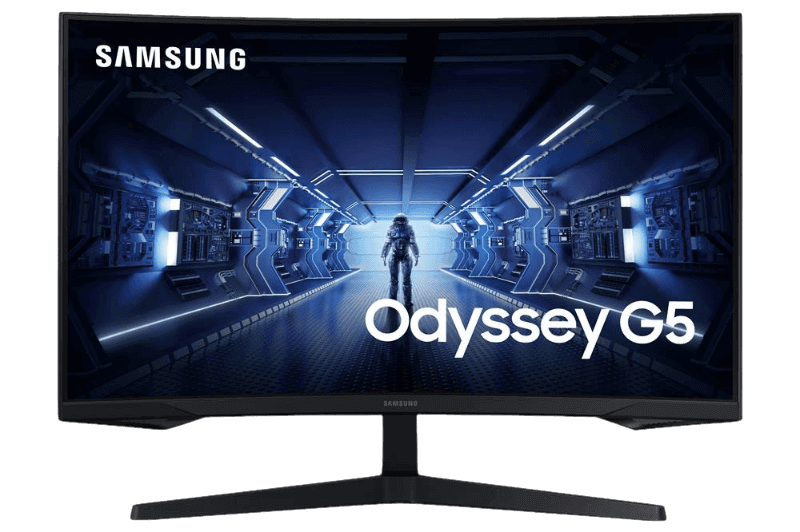
- Samsung 32-inch Odyssey G5: a large curved 1440p screen at 144 Hz.
- Samsung Odyssey G5 27-inch: a 1000R curved 1440p monitor at 165 Hz.
- 4TB NVMe SSD: room for high-resolution texture packs.
Our ASUS TUF VG27AQ1A is a fast 1440p IPS screen at 170 Hz.
1440p vs 4K FAQ
Is 4K worth it over 1440p?
On 32-inch and larger screens with a powerful graphics card, yes. On 27-inch screens, 1440p offers a better balance.
Can my PC run 4K?
With an RTX 5070 Ti and DLSS, many games run well at 4K. An RTX 5080 or RTX 5090 handles high settings comfortably.
Which is better for esports?
1440p or 1080p at high refresh rates. Frame rate matters more than sharpness in competitive games.
Does 4K use more video memory than 1440p?
Yes. 4K textures and frame buffers need more VRAM, so 16GB is recommended for high settings at 4K.
Can I switch between 1440p and 4K?
On a 4K monitor you can run games at 1440p, but the image looks softer than on a native 1440p screen. Upscaling is a better option.
Is 1440p vs 4K noticeable on a TV?
Yes. On large TVs viewed from a sofa, 4K looks noticeably sharper than 1440p.
The verdict
In the 1440p vs 4K decision, choose 1440p for high frame rates, competitive play and better value, and choose 4K for large screens, cinematic games and maximum sharpness with a powerful PC. Browse our gaming monitors, compare panel tests at RTINGS, or contact us for help.